Configuration package
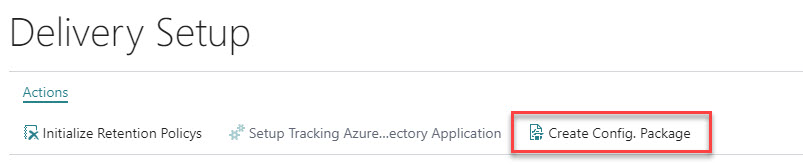
When moving from a test environment to production you can use a RapidStart configuration package. In the delivery setup there is an action that creates a configuration package that includes all relevant setup data for Logtrade Connect.
Note
Importing setup using a configuration package assumes that the same Logtrade license is used in the company where the setup is imported, since the setup data is initially created based on downloads from Logtrade given a certain license number. If you try to change the license number in the receiving company after an import of the configuration package, you will be prompted to accept a deletion of all data for the app before you can change the license number. Otherwise you would risk to have setup data that is not compatible with the Logtrade license.
Important
The intention of the configuration package is to facilitate the move from a test environment to production. It is not allowed from a license agreement perspective to use the same Logtrade license in different legal entities.
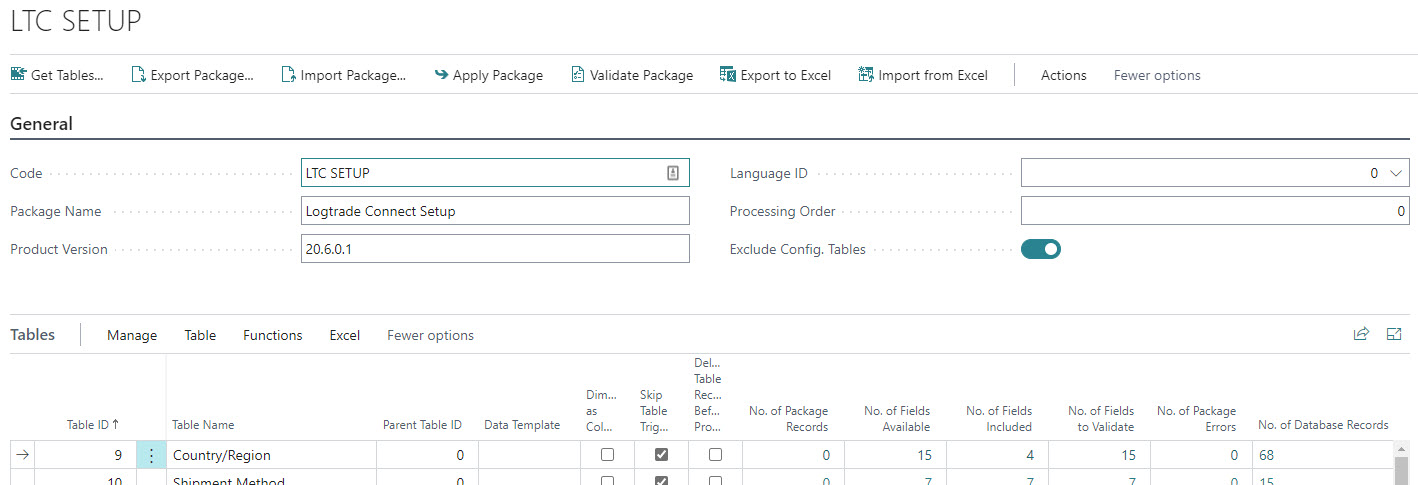
The configuration package includes some setup tables that the app has extended with new fields. Please review the fields we have chosen to include for these tables.
The configuration works as any configuration package, but here are some notes on usage.
| Action | Description |
|---|---|
| Export Package | Exports the package and setup data to a .rapidstart file. |
| Import Package | Imports the package and setup data in the receiving company. |
| Apply Package | Applies the imported data to the actual tables in the receiving company. |
Note
When applying the package in the receiving you might encounter that you have to reapply some of the tables to get the data applied/imported to the actual tables.
Note
If you have setup data that relates to data not present in the receiving company (e.g. an item number), you will need to address those issues and reapply those lines in the configuration package. This is standard behavior in configuration packages.