Consignment Error Messages
When sending a consignment to Logtrade to be confirmed for prepare och relase, any error messages returned by Logtrade are stored in the list of error messages that can be opened from the consignment. There is also a factbox tile that shows the number or error messages.
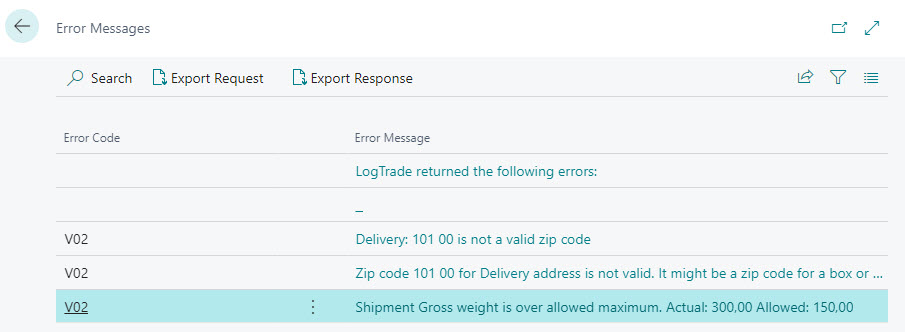
There are actions in the list for exporting web service request and response as XML-files. When contacting Logtrade support because of an error, the request and response XML-file should be attached to the support request e-mail.
Actions
| Action name | Description |
|---|---|
| Analyze with Copilot | Analyzes the selected error together with the logged request and response, using public Logtrade articles and documentation. Suggests manual checks without changing the consignment. |
| Export Request | Exports the web service request as an XML-file. |
| Export Response | Exports the web service response as an XML-file. |
Tip
Whenever you contact Logtrade support, please export both request and response and attach those xml-files to the support request.
Analyze with Copilot (preview)
The Analyze with Copilot action is shown only in Business Central online (SaaS), not in on-premises environments. This applies to both the error list and the web service communication log.
An administrator must enable Analyze Logtrade consignment errors on Copilot & agent capabilities, configure the customer's Copilot Credits billing, and allow outbound HTTP requests for Logtrade Connect. The capability uses Microsoft-managed Business Central AI resources with Microsoft Billed consumption; there is no Logtrade-hosted AI service, customer Azure OpenAI key, or Azure Function. Microsoft operates the model infrastructure, not an AI deployment in the customer's own Azure subscription. Availability, data movement consent, billing eligibility, and preview terms are governed by Microsoft.
- Select an error with a logged request and response and choose Analyze with Copilot. If the same message entry already has a saved analysis, it opens directly without website retrieval, an AI call, or additional Copilot Credits. Use Analyze Again to generate and replace it.
The same action is available on Logtrade Web Service Communication Log for entries with Contains Errors enabled. Both pages share the saved analysis on the message entry. If stored consignment error rows no longer exist, error text is extracted from response XML
Messages/ResponseMessage/Messageor SOAP fault text. Unsupported or missing error text is reported explicitly without calling AI. - Error Message shows all stored error rows associated with the same logged response, excluding explanatory rows added by the error list. Optionally enter Additional Questions and Instructions. A saved analysis restores the error text and questions used for its generation. There is no public search terms field: relevant articles are selected locally in BC using the error text and additional context. Error text, XML, and instructions are not sent to either website.
- The logged request and response XML are loaded and filtered automatically, without displaying XML text boxes in the dialog. Recognized authentication elements and attributes (including passwords, API keys, user IDs, and license details) are masked. This is not complete anonymization: shipment details, personal information, and secrets in unrecognized fields or free text may remain. Use View Request and View Response on the error list to inspect the original files before starting if needed. The original log is not changed. Carrier/product and address checks still use the actual request internally, but there is no separate carrier/product section in the dialog or report. The current consignment's carrier/product settings do not replace the values actually sent.
- Choose Analyze to send the error, filtered XML, optional question, and retrieved article excerpts to Microsoft-managed AI. Each generation, including Analyze Again, can consume credits. After successful generation, the latest result, error/question snapshot, verified source links, carrier source host, retrieval limitations, and generation timestamp are saved on the Logtrade Web Service Communication Log Entry in the current BC company. Raw XML is not duplicated. Failed generation leaves the previous saved result intact; saving requires modify permission on the message log.
- Review the explanation, evidence, suggested actions, and verified source links. Use the assist-edit button on Verified Source Links to open an article. AI suggestions may be incorrect. No shipment is changed or retried automatically.
- Choose Show as pdf to generate the paginated A4 report directly as a PDF, without a report request page or a separate Preview click. Browser settings determine whether the PDF opens in a reader or is downloaded; this does not open Business Central's standard report preview. The report includes the error messages, additional questions, analysis, verified source URLs, and retrieval limitations. It uses the existing result and the input snapshot from its generation: opening, printing, or saving it makes no additional AI call and consumes no additional Copilot Credits. Raw request/response XML is not included. The rendered report is not stored in BC automatically; its analysis data is saved on the message entry. Saved analyses and PDF copies can contain customer information and must be handled accordingly.
Only the latest successful analysis is retained per message entry; there is no analysis history. It is a dated snapshot, not automatically refreshed when documentation or shipment settings change. Deleting the message log entry also deletes its saved analysis. Existing message-log permissions and retention therefore apply. Previously saved analyses are not used as a knowledge source for other analyses; AI suggestions are not verified resolutions.
Newly generated explanations and suggested actions use the current user's Business Central session language, including when source articles or error messages use a different language. Original error text and technical identifiers are preserved. Saved analyses are displayed unchanged, even if another user generated them in a different language; opening them does not translate or regenerate their content. Analyze Again generates a new result in the current user's language and consumes Copilot Credits.
Corrective suggestions prioritize the retrieved documentation at connect.logtrade.se/bc. Zendesk provides supplementary explanations and carrier pages provide shipping rules, not BC navigation. Users must correct data and setup through supported Logtrade Connect functions in BC, not by manually editing XML or API payloads. The AI is instructed to cite relevant BC help pages for each error's suggested actions and provide navigation/field names only when documented; otherwise it must state that the procedure is unverified and refer to Logtrade support. The application adds the retrieved BC help titles and URLs cited for each error directly to its suggested actions, after validating the citations. Existing saved analyses remain unchanged until Analyze Again is used.
New analyses are grouped by error message in the PDF, with an analysis and suggested actions under each error heading. Each nonempty line in Error Message is treated as a separate error. The AI response must cover every error in order before it can be saved. Older saved analyses remain readable in their original combined format; choose Analyze Again to generate the per-error structure (consumes Copilot Credits). Opening an older analysis does not automatically regenerate it.
Public knowledge is retrieved on demand without Zendesk credentials. BC downloads the public Swedish Help Center article list in pages of 100 (up to 50 pages), without sending any search terms, and retrieves https://connect.logtrade.se/bc/index.json. It ranks the content locally and selects up to three Zendesk articles and three documentation pages. This can take longer than a server-side search. Only article text is used; tickets, user profiles, comments, and attachments are not retrieved. Article excerpts are limited to 6,000 characters. Selection quality depends on the error text and additional context, and images and linked attachments are not analyzed. Only source links supplied by retrieval can appear in the source list; an empty list means the model did not use any of the retrieved articles.
Carrier rules and address restrictions
The analysis also considers the actual request's product, goods, weight, dimensions, and address roles: Sender/Recipient and overriding Pickup/Delivery addresses, country, postcode, city, province, and street information. Carrier/product descriptions and route information improve local article selection. Missing address details or addresses represented only by IDs are reported as limitations, not filled in from potentially changed BC records.
The carrier website is resolved through Shipping Agent > Internet Address, using LTC Carrier Name matched to the request product. The consignment's shipping agent is preferred only when it matches this carrier. Otherwise, a unique configured website is used; conflicting websites, missing product mappings, and missing URLs are reported without guessing. A public information page is preferred. If the configured link is a tracking template, contains query parameters, or points to a non-HTML resource, only its validated public HTTPS website origin is used instead, with this limitation reported explicitly. Tracking values and templates are never submitted. Static HTTP URLs are upgraded to HTTPS; unsupported origins are not fetched.
BC retrieves robots.txt, the configured page, and at most three relevant linked HTML pages on the exact same host (one link level; at most 500 links inspected). Links are ranked locally by carrier, product, error, route context, and shipping-rule terms. No addresses, XML, questions, error text, or generated search terms are submitted to carrier websites. Only static public URLs are requested, without credentials or cookies. URLs with query strings, user information, tracking placeholders, IP literals, or non-HTTPS/nonstandard ports are rejected. Only HTML is analyzed; PDFs, images, JavaScript-only content, login-protected pages, and external-host links are not processed. Each page is limited to 1,000,000 characters, with a 10-second request timeout and a 6,000-character excerpt sent to AI. HTTP handling, including redirects and network restrictions, is provided by Business Central; the host restriction applies to URLs selected for retrieval, not a separately controlled HTTP redirect policy.
Carrier retrieval is optional: blocked pages, missing/unreadable robots.txt (except 404), disallowed paths, or unsupported content appear in Knowledge Retrieval and are supplied to AI as limitations. Other retrieved documentation can still be analyzed. The bounded crawl does not guarantee that all applicable conditions have been found. A homepage, a successful technical validation, or the absence of a prohibition does not establish that the carrier accepts the product, goods, or route. AI must distinguish evidence from assumptions, cite retrieved rules, respect country/product/effective-date differences, and recommend confirmation with the carrier when evidence is insufficient. Verify against representative real requests and each configured carrier website before rollout.
The analysis stops with an error before calling AI if a required Logtrade knowledge source is unavailable, or if neither relevant articles nor carrier pages are found. Carrier website failures are reported as limitations instead. There is no fallback to unauthenticated or partner-billed AI. Both XML files are required and each must be at most 60,000 bytes in the log and 60,000 characters after filtering. Invalid XML, document type/entity declarations, embedded markup in values, or excessive XML nesting stop the analysis rather than sending unfiltered or silently truncated files. Use the support request action for unsupported messages.
No separate knowledge index or Azure infrastructure needs to be operated by Logtrade or the customer. Website requests originate in the customer's BC environment; AI processing follows Microsoft's Business Central data governance controls. Public articles can still contain accidentally published sensitive information, so their editorial review remains important.
Microsoft currently documents managed AI resources for Marketplace extensions as preview and restricts their use during development/testing. This implementation deliberately contains no own-Azure fallback. Confirm eligibility and test credit consumption, HTTP access, privacy consent, and response quality in a supported customer environment before rollout. Compilation alone does not validate those service prerequisites.